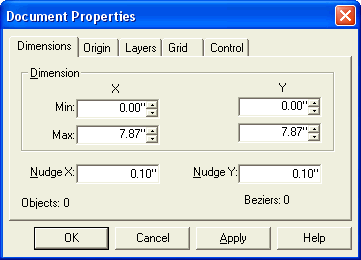
The Document Properties Dialog is used to set the variables that define
your document, like size, grid spacing, layers etc.
Dimension fields
are used to set the size of your document, the extents of which are indicated
by the Document Boundary (the dotted blue line). You can have Stardraw
A/V
Lite automatically
size your document to fit the objects that are in it by using Arrange
Document Boundary.
Nudge fields control the effect
of the arrow keys and set the amount by which spin controls in the various
properties sheets and toolbars will increase or decrease a value. At the
setting shown here, each click on the up arrow of a spin control will
increase the associated value by 0.1". The nudge value also determines
how much a selection will move if your press one of the arrow keys on
your keyboard. Often
it is a good idea to set the nudge value in relation to the size of your
grid so that, for example, each press of an arrow key could move the selection
by one gridpoint.
 Dimension fields
are used to set the size of your document, the extents of which are indicated
by the Document Boundary (the dotted blue line). You can have Stardraw
A/V
Lite automatically
size your document to fit the objects that are in it by using Arrange
Document Boundary.
Dimension fields
are used to set the size of your document, the extents of which are indicated
by the Document Boundary (the dotted blue line). You can have Stardraw
A/V
Lite automatically
size your document to fit the objects that are in it by using Arrange
Document Boundary.