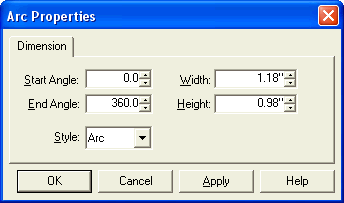
 Use the Arc dialog to define the properties of your
circle, ellipse or arc.
Use the Arc dialog to define the properties of your
circle, ellipse or arc.Use the Arc dialog to define the properties of your
circle, ellipse or arc.
The Start and End angle fields define angular start and end points for the arc; when the difference between the start and end angle is 360 degrees the arc will be a closed circle or ellipse. 0° appears at 3 o'clock and positive angle values increase anti-clockwise.
The Width and Height fields define the overall extents of the object and not the diameters of the principal axes.
Style defines the outline options and is normally used when the arc is not a complete circle or ellipse. When Pie is selected the arc has lines drawn from its centre to its start and end point. When Arc is selected these two lines are not present. Fill styles defined in the Style Toolbar can also change the apparent outline of your arc. When you select a fill style other than Open, an Arc will have a straight line added between its start and end points; this is known as a 'Chord'.
|
|
|
|
|
Arc |
Pie |
Chord (Arc with Solid fill) |


